
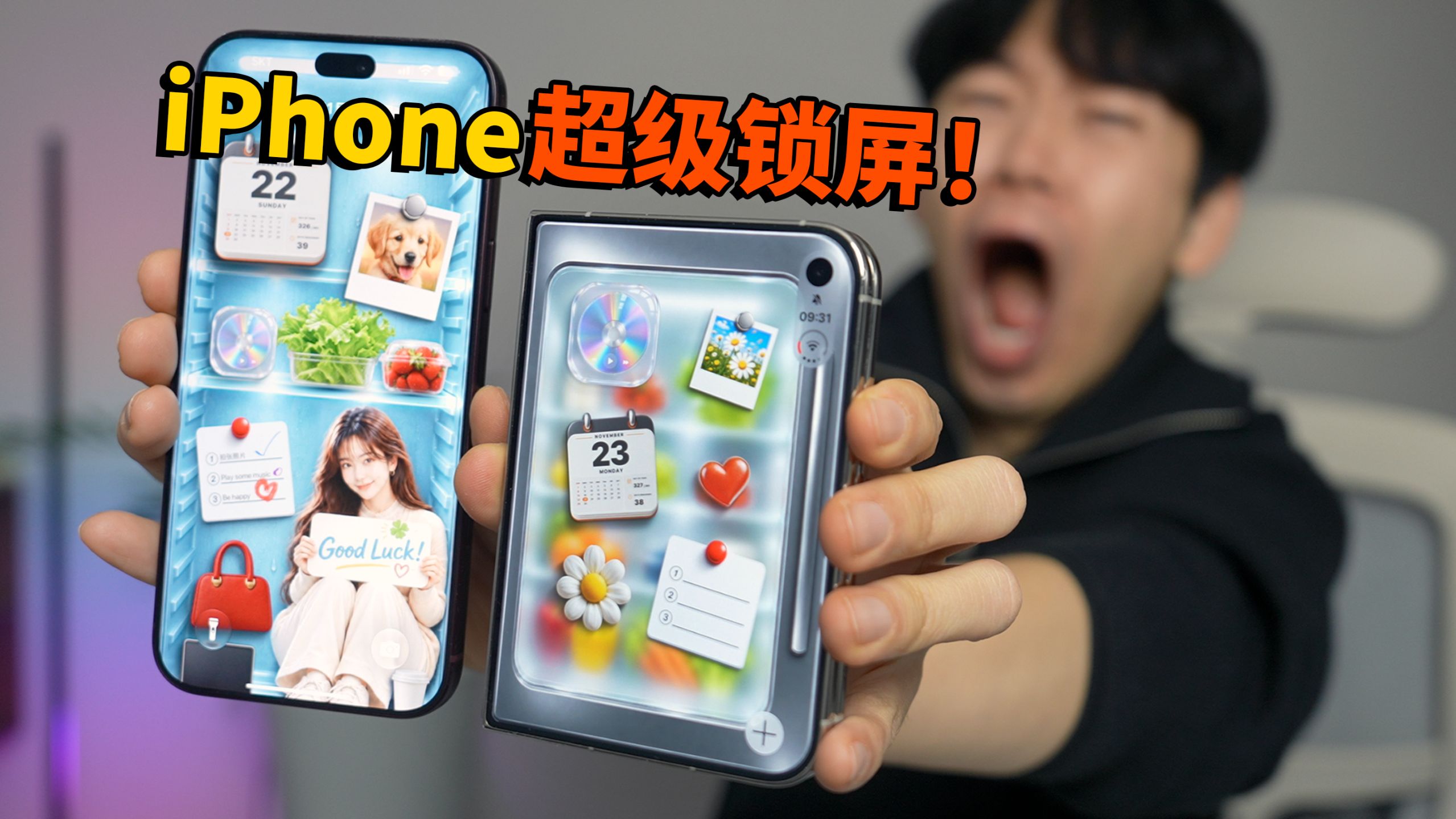
It has already achieved this dynamic effect. Now it works. It also has this dramatic, even more powerful 3D depth effect. The date and remaining days are shown at the top, and we can freely doodle right on our lock screen. With one tap, it plays. "1go to chino" and "Xin" — this super powerful iPhone lock screen customization app, Dual Free GE, has received a major update. To make the lock screen interface more user-friendly, more personalized, more fun, and more dynamic, this version 2.0 adds a virtual assistant, Little Kim. Let's go into the app now and take a look.
The default interface looks like this. In the previous version, version 1.0, many people said that on the standard iPhone version you couldn't open the fridge. Well, version 2.0 now adds an "open fridge" feature. After we tap the plus button, there's an "open fridge" option here. Once tapped, "DUANG" — the door swings open. Oh, it's very beautiful inside. All these items can be moved freely. And to make the whole lock screen interface more dynamic, plus, according to folk legend, looking at beautiful things every day can help us live longer and live more happily, I've added the virtual assistant KIM here.
After we tap the plus button, there's a virtual assistant, Little KIM, here. Once tapped, "zhuang" — it displays "good luck" with a little heart. Every day, on our lock screen, we can see this very beautiful virtual assistant, and it keeps us lucky and keeps us alert. In this state, we can move it freely, customize it freely, zoom in and out — all of that is possible. The add-photo feature that already existed in version 1.0 — we can adjust it, add photos freely, or hey, now we can copy them, adding multiple photos at will.
We can delete all the other items and just fill the screen with photos. All photos work. After adjusting it like this, we can tap the plus button and then save the high-definition large wallpaper. OK, it's saved successfully. Not only can we save the fridge interior, we can also close the fridge — ah, this exterior. Back in version 1.0, many people said the fridge was a bit too cartoonish — "what is this thing?" So this time, a very modern, modern-style, semi-transparent gauze-like large fridge has been added. We can save both the fridge interior and exterior as high-definition large wallpapers, saving them freely.
Then we go into the large photos. Look, the two wallpapers from just now have already been saved. After we tap Share and select "Use as Wallpaper," that's it. When you first enter, it has this zoomed-in effect; we need to turn that off — turn off the depth effect. And this one is very important — we must turn it on. This way, it can generate the 3D spatial effect. You can turn it on or off according to your preference. If you've added photos or a calendar here, I suggest shrinking them down. After that, it's OK — it has already achieved this dynamic effect. Then tap Add.
That's it. Set as Lock Screen Pair, set as wallpaper. Hey, let's take a look at the lock screen interface. When we move it, Little KIM plus these little tiles — the dynamic tiles — all of these can be edited individually. Plus the sense of depth of the whole fridge — when we tilt it like this, it's very dramatic, very beautiful. Oh, the 3D spatial effect. And if you're using an iPhone Duo, on the lock screen, this time it solves the biggest problem of version 1.0 — in the old version, when we expanded it, it couldn't show that really impressive effect.
But now it works. It has the same dramatic 3D effect, and you can turn it on or off. The setup method is the same. So beautiful. And hey, in this app, after we tap the plus button, we can add ornaments — little gift-like items. For example, let me add a big airplane. I'll put it here. Right now it seems pretty useless, but after we save the high-definition wallpaper — saved successfully, OK — then we go into Settings. In this state, we tap Share and again use it as the large wallpaper. There it is. We need to set it as a spatial scene.
Then when we tilt it — oh my, dramatic — there it is! This is exactly the effect I wanted. This is the most powerful spatial effect. The airplane looks like it's about to take off, like it's about to pop out. Very beautiful. Through the left and right of the screen, plus this sense of depth, plus a little airplane, it perfectly showcases an even more powerful 3D spatial effect. You have to try it. Of course, our fridge can be customized freely. Oh, both iPhone Duo and the regular version work. Here we can choose the large fridge — this one is modern frosted, this one is retro.
We can choose among these. Let's go with the red one. Hey, coming in — Little K. Of course, if we don't like it, we can remove Little Kim. You can arrange your own little widgets — all of that is possible. Then let's save it again, just a simple save, set as wallpaper. So many fridges, interior and exterior, all work. Sometimes it zooms in — at that point, we pinch with two fingers, then open the spatial scene, pinch again, pinch again — OK, that's it. All kinds of fridges, interior and exterior, we can set up. We close it and come back. This is the fridge exterior. Then here we can choose the fridge.
This time, many very beautiful styles have been added, different from those retro fridges — modern frosted. Within the modern style there are five colors: misty white, bright white, cream, stainless steel, and graphite black. All of these are available. We can save a wallpaper for each of these effects individually, then set it as the lock screen — all possible. We tap the plus button, then choose the fridge. The default is this cream color — a very beautiful overall effect. Then let me demonstrate the frosted effect — it comes in black, white, blue, and red, all of them. Green, blue, orange frosted. And then a cream one — all of these are available.
Also, the calendar and other elements on here—if you look closely, they're all dynamic. What's today's date? November 22nd. It pulls information from the system and directly displays November 22nd, Sunday. And over here, we can see the calendar for the entire month. If you look carefully—hey, what's this number? It turns out today is the 326th day of this year's 365 days. Only 39 days are left in the year. All of these are dynamic, and we can set them however we like. As for the photo, I already mentioned that earlier. Now, with the notepad, we can freely type in whatever we want.
We can restore the size, zoom in and out, clear it and type again. Then there's handwriting on top—we can doodle freely, all of that works. After tapping save, everything is dynamic and can be fully saved. Then we pick our big fridge, say this cream color, or maybe the more three-dimensional graphite black. In this case, we can also duplicate multiple notepads. Honestly, just doing three things a day is enough—any more and it gets messy. We can add items freely, delete the ones we don't need, and arrange them however we want. Hey, and then you can save it as an HD wallpaper.
Is that all it takes? Oh, use it as the wallpaper—OK. And this clock, we can turn it off too. All of that is possible. Tap OK, tap save, set as wallpaper with forced composition—and there's the lock screen effect: today's calendar, then the to-do list, then our favorite photo. These widgets are incredibly realistic and really impressive, with the big fridge right there on our lock screen. Of course, all these features are available on the regular iPhone too—exactly the same, identical. Over here, we can choose the fridge, the same retro style, in seven colors total: black, white, blue, yellow—every color you could want.
The modern one is just like before, but the whole fridge is longer. Matte finish—feel free to pick cream color. Again, the calendar is dynamic: today's date, the remaining days—all of these we can see. And we can move all of these around freely. While using this app, this time they've also added a CD player, completely transparent in style. When we play it, one tap and it plays; tap again and it pauses. We can move it around freely, zoom in and out. And when we press and hold—look, this is such a classic, one by one.
Then there's a heart—this song is in here too. "Ikko TAKO and Hoshi Ikko," blooming, one second, one heart, bite by bite. "Give me on the door, call away, give me on the door, door away." The full version of this song is completely built into the app. There are also some others, like this really nice one, "Beautiful Girl," "So Much Chain Your Quiet Smile," and another one, "Together We Go."
All of these songs are included. So on both the iPhone and the iPhone Duo, we can freely open the fridge, close the fridge, choose whatever we like—pick our favorite style, add a dynamic calendar, add a dynamic notepad, a daily notepad, add favorite photos, or add this really powerful 3D effect. We can do all of it through this app. And everything bundled together costs just $2.99—you can't go wrong, no rip-off here, just $2.99. Plus, version 2.0 has now officially launched on the App Store.
We can have it right now. Thank you so much for everyone's support. The Kino—happy, bite by bite by bite.