
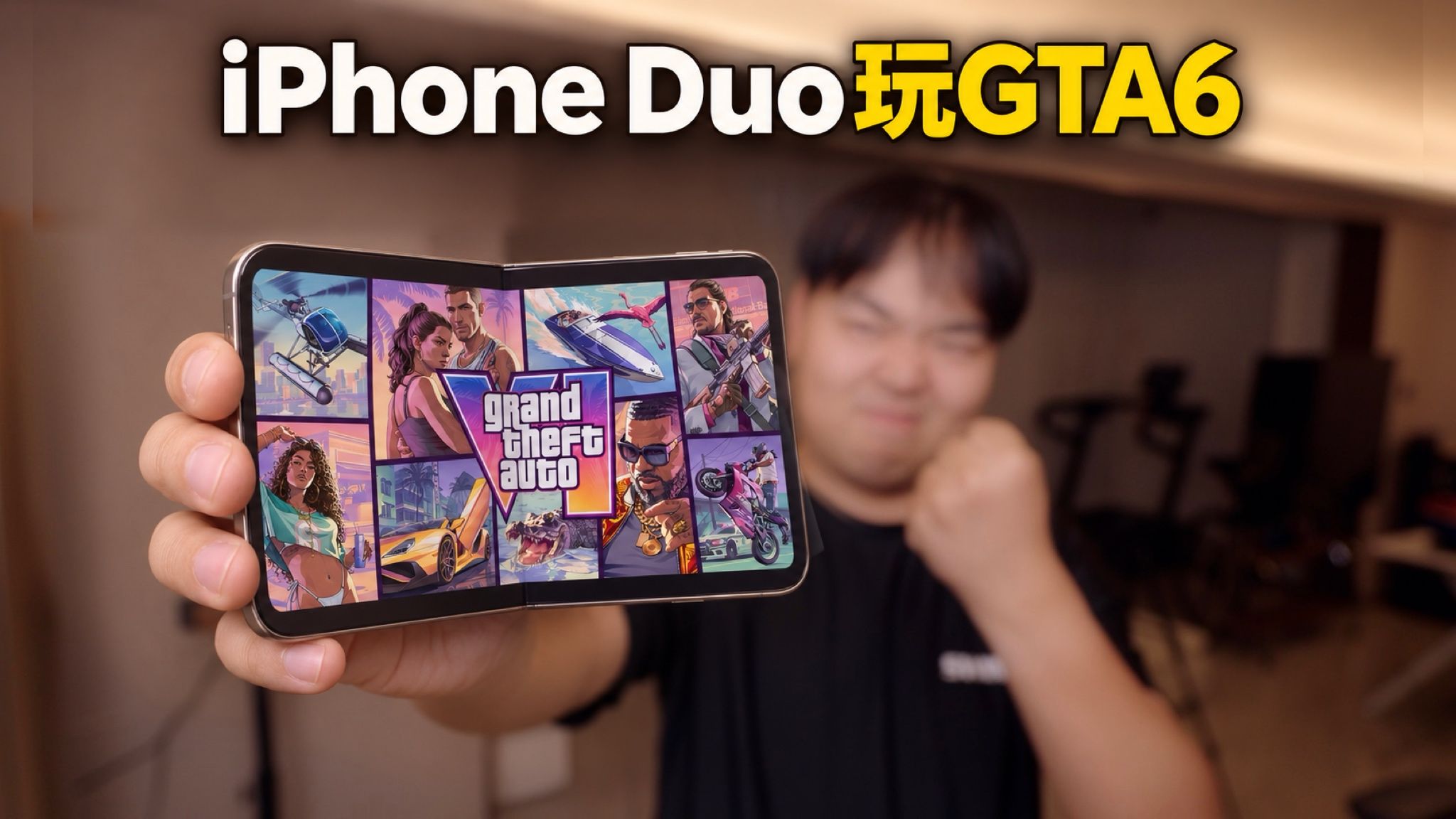
[00:00:00] You can play GTA 6 on a TV, but who knew you could also play it on a phone.
[00:00:04] Look, everyone — what's displayed on the iPhoneDoor right now is the GTA 6 screen, exactly the same as on the TV.
[00:00:08] In this video, we'll share what it's like to stream GTA 6 on the iPhoneDoor. Let's take a look together.
[00:00:14] First, this is the console I connected to last time. As you can see, the app still isn't adapted for this, [00:00:19] but there's a button here for switching between portrait and landscape mode. Let's switch it like this, and now it's in landscape.
[00:00:23] In landscape mode, although it's not perfectly adapted, it's close to a 16:9 aspect ratio, [00:00:28] with a little bit of black bars at the top and bottom. [00:00:30] That's acceptable. [00:00:31] That's acceptable. [00:00:31] Let's tap to connect. [00:00:32] It's still in the process of scaling up. [00:00:35] Everyone, look— [00:00:35] it's connecting to the network. [00:00:39] It's connected. [00:00:41] Everyone, look— [00:00:41] it's connected, and I'm playing GTA 6 right now. [00:00:44] I'm in the car. [00:00:45] Everyone, watch me get out of the car. [00:00:46] Actually, the frame rate is [00:00:49] almost no different from the PS5. [00:00:50] And the joysticks on both sides— [00:00:52] everyone, look— [00:00:52] they're hidden, [00:00:53] hidden joysticks. [00:00:54] Now let's set this car as the destination. [00:00:58] Let's go drive our car [00:00:59] and see what the driving experience is like. [00:01:02] OK. [00:01:04] Start the engine. [00:01:06] Let's go. [00:01:06] The audio is completely in sync. [00:01:10] The sound and the picture are completely in sync. [00:01:12] No problem there. [00:01:13] Wow, it's really hard to control. [00:01:22] When we use a controller, [00:01:24] the triggers have pressure sensitivity, right? [00:01:26] If we press lightly, [00:01:27] the car drives slowly. [00:01:28] If we press hard, the car goes fast. [00:01:30] But here, [00:01:31] when using these virtual buttons, [00:01:33] everyone, look, there's only the press option. [00:01:35] Once I press down like this, [00:01:36] it's full throttle immediately. [00:01:37] So driving is really difficult. [00:01:39] This is a drawback. [00:01:40] If we want to press reverse and the directional keys at the same time— [00:01:43] everyone, look, the directional keys are here— [00:01:44] right? [00:01:45] To press reverse, [00:01:45] we have to press like this, [00:01:47] and we have to use this finger as well. [00:01:49] I find it a bit inconvenient. [00:01:50] And when operating like this, [00:01:51] the minimap at the bottom gets blocked too. [00:01:53] Everyone, look— [00:01:53] it's as if the minimap isn't fully displayed. [00:01:55] Part of it gets covered. [00:01:56] Now let me press up top to open the map. [00:01:58] Let's navigate. [00:02:00] Let's navigate to a place. [00:02:01] Everyone, look— [00:02:02] it doesn't support touch input at all. [00:02:03] It's like [00:02:04] one of those phones that only has buttons. [00:02:06] There's still no touch support. [00:02:08] So this is what it looks like unfolded. [00:02:09] Are you all curious [00:02:10] what it looks like after folding? [00:02:11] Let me fold it for you. [00:02:12] It turns into [00:02:14] something like a handheld gaming console mode. [00:02:16] Everyone, look— [00:02:17] it's become like this. [00:02:19] Joystick, joystick... [00:02:21] The small screen on top— [00:02:23] let's just say it's barely watchable. [00:02:24] Wow, using such a tiny screen. [00:02:26] So what if we turn it vertical? [00:02:28] What about like this? [00:02:30] Let's turn it vertical. [00:02:31] Everyone, look— [00:02:32] in this unfolded state turned vertical, [00:02:33] you can't play the game on the top screen [00:02:35] while controlling it with the bottom screen. [00:02:38] Everyone, look— [00:02:38] after the screen displays, [00:02:40] the content can extend to the top, [00:02:42] but there are no buttons here. [00:02:44] I think this is really unintelligent. [00:02:45] It's clearly not adapted. [00:02:46] And if I force it into portrait mode, [00:02:48] everyone, look— [00:02:48] the top still only has a small area. [00:02:51] You can't adjust how big this display area is [00:02:53] or how long the bottom area is. [00:02:54] Everyone, look— [00:02:55] like this, [00:02:56] the buttons even fold over like this. [00:02:57] It still can't achieve a setup with buttons on the bottom [00:02:59] and the picture on top. [00:03:01] Folded-over buttons definitely can't be pressed. [00:03:03] Controlling it this way is really uncomfortable. [00:03:05] Now that we've connected the controller, let's try controlling it [00:03:07] and see what's different with the controls. [00:03:09] Look, the car now has an idle. [00:03:12] Everyone, look, it's idling. [00:03:14] When I want to drive slowly, [00:03:15] I press the trigger lightly. [00:03:17] This controller is perfectly ported to the iPhone. [00:03:20] There's no problem controlling it at all. [00:03:21] Everyone, look— [00:03:23] when I want to drive slowly, I go slower. [00:03:25] And
After that, when I want to go all the way right, I just open the throttle a bit faster. [00:03:27] You see, there are no problems at all now. [00:03:31] And look, everyone, [00:03:32] the driving footage is also quite smooth. [00:03:34] LAN streaming is just smooth. [00:03:35] Plus, when we control it with a gamepad, [00:03:37] the on-screen buttons completely disappear, [00:03:39] giving us a big screen [00:03:40] purely for display. [00:03:42] It's really excellent. [00:03:42] This one in the bottom right corner— [00:03:44] you can even see the HUD clearly. [00:03:45] It won't get blocked by your hands [00:03:47] while you're operating the controls. [00:03:50] There's also a possible use case like this: [00:03:52] the PS5 itself [00:03:53] might just be plugged into power [00:03:54] without a screen connected, [00:03:56] but I want to use the PS5's performance [00:03:57] in another room. [00:03:59] In that case, streaming to a screen [00:04:01] and playing is really great. [00:04:02] As of right now, [00:04:03] the streamed picture [00:04:04] is virtually indistinguishable [00:04:08] from actually playing on the PS5 with a cable connected. [00:04:09] Stability, smoothness, frame rate— [00:04:11] as far as I can see, no problems so far. [00:04:12] I've been playing here for about ten-plus minutes, [00:04:14] and there have been no connection failures or stuttering, [00:04:17] and no drop in image quality either. [00:04:19] At least to my naked eye, [00:04:20] the display on this screen [00:04:22] still looks quite sharp. [00:04:23] Just now, we tested it over WiFi [00:04:25] on the same local network. [00:04:26] Next, let's try it over mobile data [00:04:28] and see if the streaming is still just as smooth. [00:04:30] OK everyone, we're now outside. [00:04:38] It's super, super cold. Let's try this— [00:04:40] can the PS5 connect? [00:04:43] OK, the interface is now open. [00:04:46] Let's tap connect. [00:04:48] Look, everyone—mobile network, no problem. [00:04:51] Tap connect. Wow, please connect soon, I'm freezing to death. [00:04:54] Oh, it's so cold. [00:04:55] It might take a few more minutes. Wow, it's connecting so slowly. Sony, [00:05:00] Sony, stop dawdling. Sony! [00:05:06] What's going on? It won't connect. Ugh. [00:05:08] Look, everyone—I've switched to another network. Let me confirm again [00:05:09] and see if it can connect. [00:05:11] Man, I'm freezing to death. [00:05:12] Let's try one last time to see if it can connect. [00:05:17] If it doesn't connect this last time, I'm leaving. [00:05:22] I'm freezing to death. [00:05:23] Hurry, hurry, hurry, hurry, hurry, hurry, hurry, hurry! [00:05:26] As you can see, everyone, no matter what, this iPhone Door [00:05:31] just cannot connect. [00:05:32] No matter what, it cannot connect to this [00:05:34] PS5, okay? [00:05:36] And my PS5 at home is definitely powered on right now— [00:05:38] there's no problem there. [00:05:39] Whether at home or outside, [00:05:41] it simply cannot connect via mobile data. [00:05:43] We're heading upstairs. [00:05:44] We're not trying anymore. [00:05:45] We're not giving it another chance. [00:05:46] Alright, everyone, that wraps up the full process of streaming the PS5 with the iPhone Door in this episode. [00:05:50] In my hands-on test of GTA6, it's playable over WiFi on a local network, [00:05:54] but over mobile data outdoors, it simply cannot connect no matter what. [00:05:57] If any of you know a way to get it connected, feel free to tell me, [00:05:59] and I'll give it another try. [00:06:00] If it connects, I'll let you all know right away in the comments section. [00:06:02] OK, please drop a like and follow. [00:06:04] See you in the next video. Bye-bye!